配置总览
<project xmlns="http://maven.apache.org/POM/4.0.0" xmlns:xsi="http://www.w3.org/2001/XMLSchema-instance"
         xsi:schemaLocation="http://maven.apache.org/POM/4.0.0 https://maven.apache.org/xsd/maven-4.0.0.xsd">
    <modelVersion>4.0.0</modelVersion>

    <!-- The Basics -->
    <groupId>...</groupId>
    <artifactId>...</artifactId>
    <version>...</version>
    <packaging>...</packaging>
    <dependencies>...</dependencies>
    <parent>...</parent>
    <dependencyManagement>...</dependencyManagement>
    <modules>...</modules>
    <properties>...</properties>

    <!-- Build Settings -->
    <build>...</build>
    <reporting>...</reporting>

    <!-- More Project Information -->
    <name>...</name>
    <description>...</description>
    <url>...</url>
    <inceptionYear>...</inceptionYear>
    <licenses>...</licenses>
    <organization>...</organization>
    <developers>...</developers>
    <contributors>...</contributors>

    <!-- Environment Settings -->
    <issueManagement>...</issueManagement>
    <ciManagement>...</ciManagement>
    <mailingLists>...</mailingLists>
    <scm>...</scm>
    <prerequisites>...</prerequisites>
    <repositories>...</repositories>
    <pluginRepositories>...</pluginRepositories>
    <distributionManagement>...</distributionManagement>
    <profiles>...</profiles>
</project>
<modelVersion>
- 说明:POM版本,目前4.0.0,这是目前唯一支持的POM版本,并且始终是必需的
<groupId>
- 说明:在组织或项目中,通常是唯一的,例如所有核心的maven构件都应该位于groupId下,groupId不一定非得是xxx.xxx.xxx(比如junit项目),注意:groupId没有必要与项目的包结构相对应,但是遵循这一做法是好的,groupId的分隔符不完全一定是"点",比如在Unix操作系统中,使用"/"作为目录分隔符
<artifactId>
- 说明:artifactId通常是项目名称,它与groupId一起构成一个密钥,将该项目和世界上其他的项目区分开
<version>
说明:groupId:artifactId表示一个单独的项目,但是我们无法确定正在讨论的是哪个版本,所以加上版本标识后,maven构件的存储库里就通过不同的版本彼此区分开来
正式版本和快照版本对比:它们的主要区别在于版本号和发布周期
- 正式版本(RELEASE):正式版本是一个稳定、有序的发布版本,用于生产环境部署,版本号通常不包含任何特殊标识,例如1.0.0
- 快照版本(SNAPSHOT):快照版本表示项目是一个开发中或不稳定的版本,版本号通常包含
-SNAPSHOT后缀,例如1.0.0-SNAPSHOT
关于正式版本和快照版本的jar包的更新机制
引入正式版本的依赖时,只有当 <version> 改变了,才会下载最新的依赖,假如一开始引入了一个正式版本的依赖,版本号为1.0.0,之后这个依赖的代码修改了,但是版本没有改还是1.0.0,那么使用方只能删除本地的依赖,重新加载maven下载了
引入快照版本的依赖时,允许自动更新,但是SNAPSHOT依赖一天只能自动更新一次,所以要每次构建都获取最新的依赖时,手动触发的几种方式如下
使用
-U参数:mvn clean compile/package/install/deploy -Uidea中勾选
Always update snapshots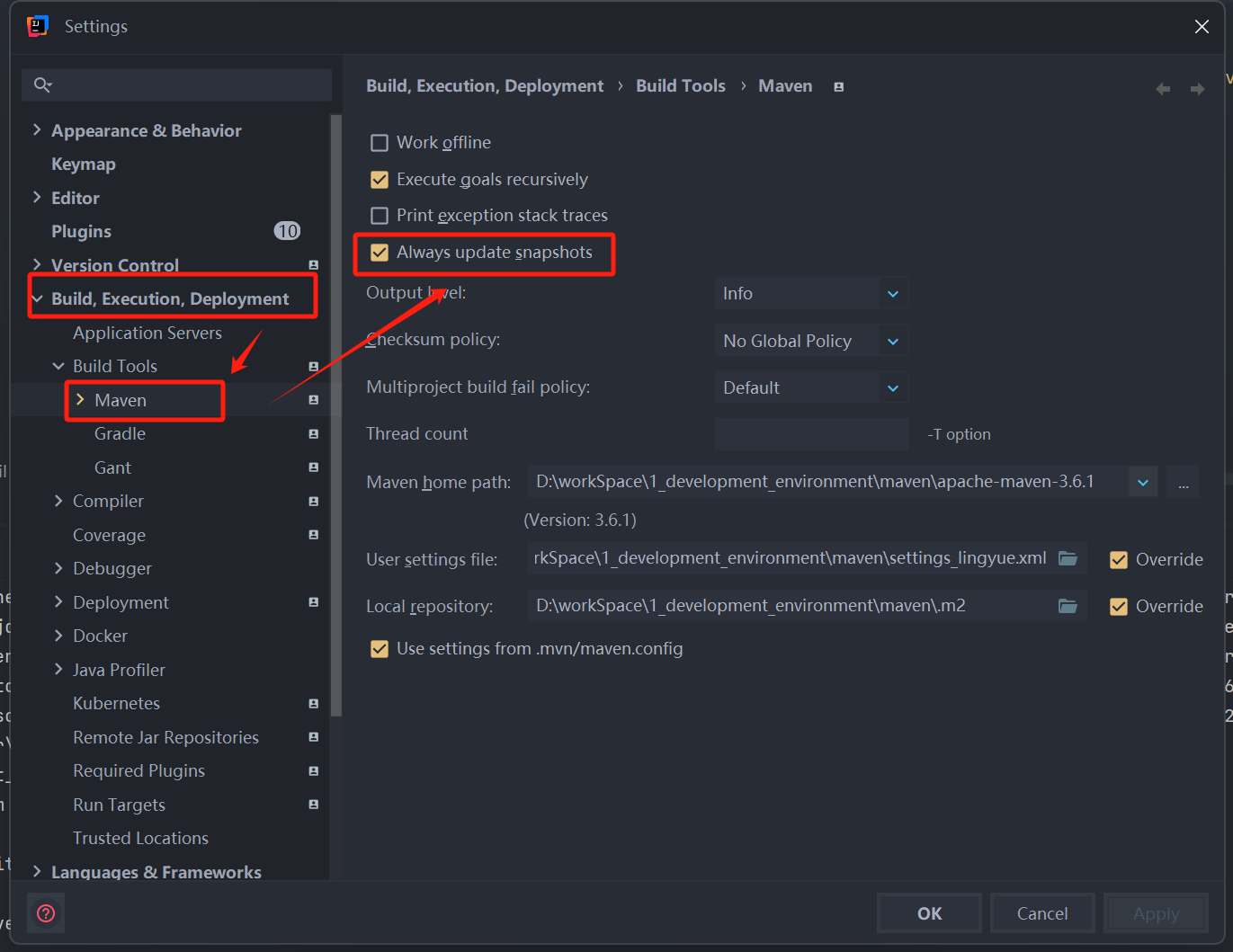
修改settings.xml配置:在
repository和pluginRepository下配置总是更新Maven snapshots依赖xml<snapshots> <enabled>true</enabled> <!-- 更新策略可以是 always:总是、daily(每天,默认值)、interval:XXX(定时器,时间单位:分钟)、never(从不) --> <updatePolicy>always</updatePolicy> </snapshots>
<packaging>
说明:项目的打包类型,可以打包的类型有
pom、jar(默认)、maven-plugin、ejb、war、ear、rarpom类型说明:当maven分模块进行管理时,都会有一个父级项目,与jar不同的是,父级生成的构件只是它自己本身,没有代码需要编译或者测试,也没有资源需要处理,只是为了聚合工程或者传递依赖用的,所以一般所有的父级工程的打包类型都是pom
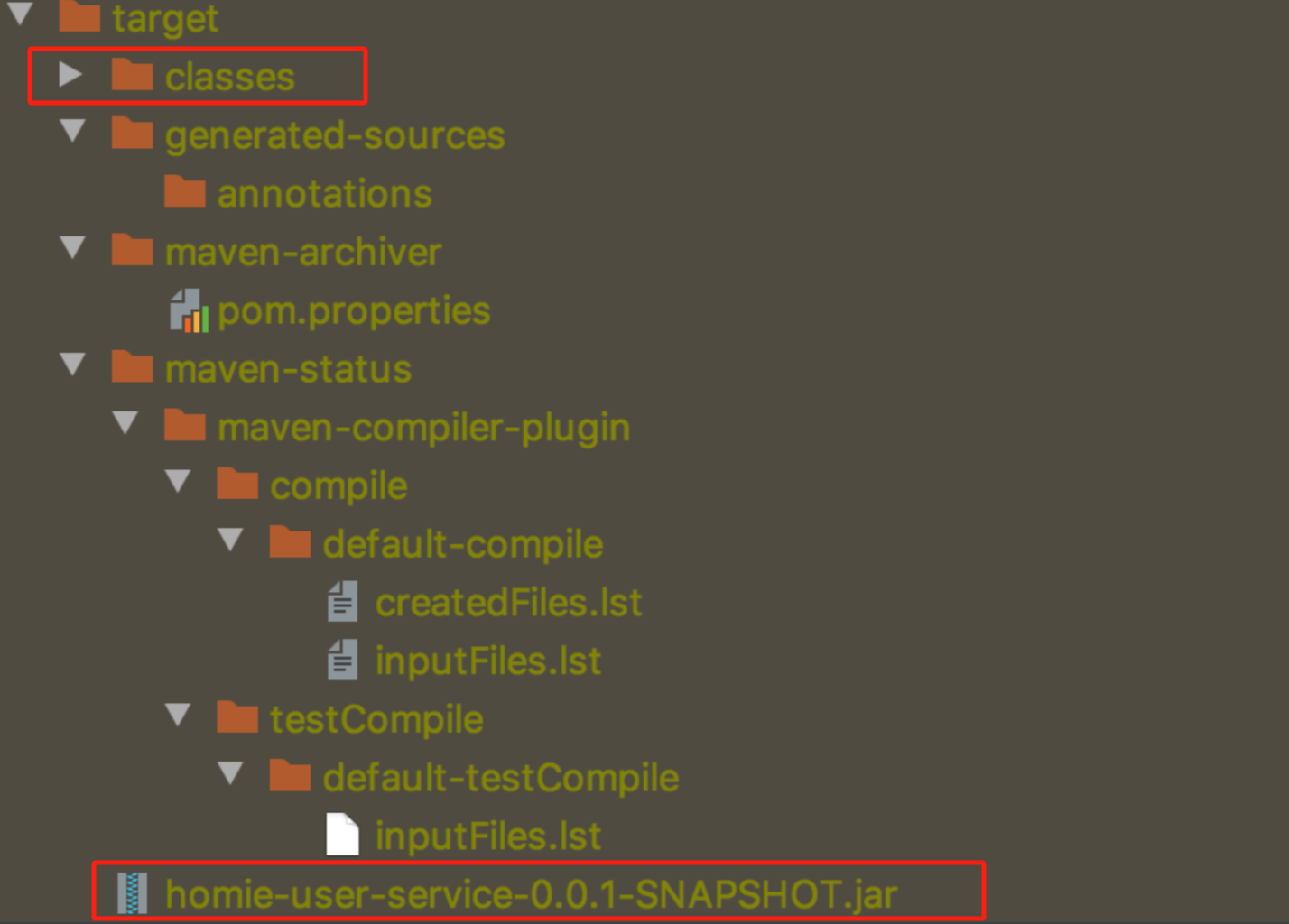
jar类型说明:该方式用于生成Java类库或可执行的Java应用程序。它将项目中的所有class文件、资源文件打包成一个JAR文件,便于分发和使用。当项目构建时,在项目中与src文件夹同级新生成了一个target文件夹,这个文件夹内的classes文件夹即为项目中java文件层级结构编译后形成的文件夹,而最下方的jar文件即为calsses文件夹的压缩版本
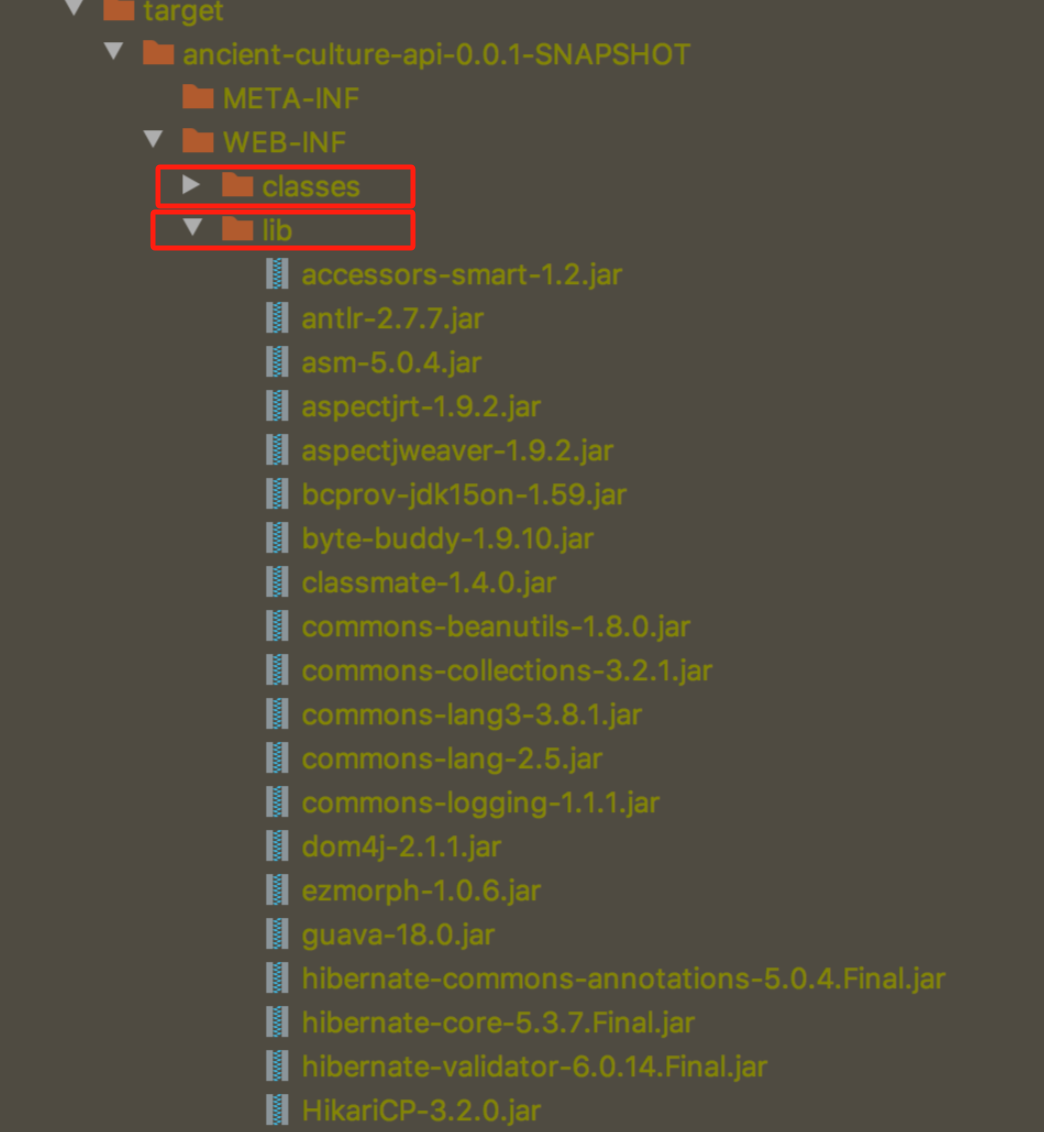
war类型说明:该方式用于生成Java Web应用程序的部署包。它将项目中的所有Web资源文件、class文件和依赖的JAR文件打包成一个WAR文件,便于部署到Servlet容器(如Tomcat、Jetty)。当项目构建时,编译后的class文件会按照层级结构放在WEB-INF/classes文件夹下,与此同时,项目所依赖的其他jar包会放到WEB-INF/lib文件夹下
maven-plugin类型说明:maven提供了很多的插件,但是这些插件在你的项目中可能达不到场景的要求,所以可以自定义一个maven插件来满足项目的需求,此时自定义的maven插件的打包类型就是maven-plugin
ejb类型说明
ear类型说明
- ear概念:在复杂的企业IT架构中,web模块主要用途是在展现层,所以业务的处理交给ejb,但是有时候需要将某些ejb和web打包一起部署,那这就是企业应用ear
- 相关链接
其他打包类型:rar、msi、rpm、tar、tar.bz2、tar.gz、tbz、zip,暂不了解
<dependencies>和<dependency>
- 说明:大多数项目在构建和运行时都依赖其他项目,甚至其他项目还依赖了另外的项目,此时,maven在编译的时候就会去下载<dependencies>中的依赖项
- <dependency>依赖项参数详情:maven/maven中的dependency标签参数
<dependencyManagement>
说明:为了保证项目中的各个模块所使用的包的版本的一致性,我们需要在父模块中进行版本号的锁定,然后子模块在引入依赖时,只需要指定groupId和artifactId即可,version自动就使用了父模块指定的版本号,当然,如果子项目声明依赖时指定了版本号,那就以这个指定的版本号为主
xml<!-- 父模块 --> <dependencyManagement> <!-- redisson --> <dependency> <groupId>org.redisson</groupId> <artifactId>redisson</artifactId> <version>1.0.0</version> </dependency> </dependencyManagement> <!-- 子模块 不指定版本号,version就是父模块声明的1.0.0 --> <dependencies> <dependency> <groupId>org.redisson</groupId> <artifactId>redisson</artifactId> </dependency> </dependencies>xml<!-- 父模块 --> <dependencyManagement> <!-- redisson --> <dependency> <groupId>org.redisson</groupId> <artifactId>redisson</artifactId> <version>1.0.0</version> </dependency> </dependencyManagement> <!-- 子模块 指定版本号,version使用的是指定的 --> <dependencies> <dependency> <groupId>org.redisson</groupId> <artifactId>redisson</artifactId> <version>2.0.0</version> </dependency> </dependencies>注意:dependencyManagement在父模块中只是声明依赖,并不实现引入,所以子项目需要显式声明所需用的依赖
<parent>
说明:指定当前项目的父工程
代码示例
xml<parent> <groupId>com.dpos</groupId> <artifactId>dpos-biz</artifactId> <version>1.0-SNAPSHOT</version> <!-- 相对路径,一般不用 --> <relativePath>../dpos-biz</relativePath> </parent>
<module>
说明:指定当前项目(父工程)拥有哪些子工程模块
代码示例
xml<modules> <module>dpos-biz-subModule1</module> <module>dpos-biz-subModule2</module> <module>dpos-biz-subModule3</module> <module>dpos-biz-subModule4</module> </modules>
<properties>
说明:在此标签内,用户可以自定义属性和属性值,这些属性在POM文件的任何地方都可以通过${xxx}的方式来引用,其中xxx就是用户自定的属性名
代码示例
xml<properties> <mysql.version>8.0.21</mysql.version> </properties> <dependencies> <dependency> <groupId>mysql</groupId> <artifactId>mysql-connector-java</artifactId> <version>${mysql.version}</version> </dependency> </dependencies> <!-- 上述的mysql.version就是用户自定义的一个属性名,标签的内容8.0.21就是属性值 -->补充:${}里除了可以指定自定义的属性名,还可以引用系统属性
用法 介绍 说明 $ 自定义属性 在<properties>标签中定义的属性 # 平台的系统环境变量 windows、linux系统的环境变量,使用 mvn help:system 查看所有可用的系统环境变量 $ pom文件中project标签里所有标签的值 例如 ${project.version} 获取的是 <version>标签中的值
具体可以获取哪些参考官方文档:Maven Model – Maven$ maven安装目录/conf/settings文件中的属性 例如 ${settings.localRepository} 获取的是配置文件中的本地仓库路径
<build>
配置说明
基本元素
xml<build> <defaultGoal>install</defaultGoal> <directory>${basedir}/target</directory> <finalName>${artifactId}-${version}</finalName> <filters> <filter>filters/example.properties</filter> </filters> <sourceDirectory>src/main/java</sourceDirectory> <testSourceDirectory>src/test/java</testSourceDirectory> <outputDirectory>target/classes</outputDirectory> <testOutputDirectory>target/test-classes</testOutputDirectory> 其他配置... </build>- defaultGoal:没有指定目标、阶段,则执行默认的目标、阶段。如果指定了目标、阶段,则按照指定的目标、阶段执行。如上配置时,相当于执行了 mvn install
- directory:build目标文件的存放目录,默认在${basedir}/target目录
- finalName:build目标文件的名称,默认情况为${artifactId}-${version}
- filters:有时在项目构建阶段,资源文件(例如:application.properties)需要从其他文件读取某些配置(值)。其他文件属性的读取方式就是通过 ${xxx} 来读取。filters标签就是用来指明其他文件路径的,默认的filter路径是 ${basedir}/src/main/filters/,简单来说就是:定义在example.properties的文件中的name=zhangsan键值对,在build时资源文件中${name}会被替换成zhangsan
- sourceDirectory:配置项目的源代码目录,默认为 src/main/java
- testSourceDirectory:配置项目的测试代码目录,默认为 src/test/java
- outputDirectory:配置项目的输出目录,默认为 target/classes
- testOutputDirectory:配置项目的测试输出目录,默认为 target/test-classes
Resources配置:用于包含或者排除某些资源文件
xml<build> 其他配置... <resources> <resource> <targetPath>META-INF/plexus</targetPath> <filtering>false</filtering> <directory>${basedir}/src/main/plexus</directory> <includes> <include>configuration.xml</include> </includes> <excludes> <exclude>**/*.properties</exclude> </excludes> </resource> </resources> </build>- resources:资源列表父标签,每一个元素都描述与项目关联的文件是什么和在哪里
- resource:资源列表元素标签,含有资源文件的路径等信息
- targetPath:指定资源文件build以后的存放路径,默认是${basedir}(根路径)下
- filtering:表示项目build时是否过滤掉该资源
- directory:定义资源文件所在的文件夹,默认是${basedir}/src/main/resources
- includes:指定directory要包含哪些文件,使用 * 作为通配符
- excludes:指定directory要包忽略哪些文件,使用 * 作为通配符,如果includes和excludes同时包含了某个路径,以excludes为准
plugins配置:用于指定使用的插件
xml<build> 其他配置... <plugins> <plugin> <groupId>com.test.zhl</groupId> <artifactId>demo-plugin</artifactId> <version>1.0-SNAPSHOT</version> <extensions>false</extensions> <inherited>true</inherited> <configuration> <classifier>test</classifier> </configuration> <dependencies>...</dependencies> <executions> <execution> <id>echodir</id> <goals> <goal>run</goal> </goals> <phase>verify</phase> <inherited>false</inherited> <configuration> <tasks> <echo>Build Dir: ${project.build.directory}</echo> </tasks> </configuration> </execution> </executions> </plugin> </plugins> </build>- plugins:插件列表父标签
- plugin:插件列表元素标签,含有插件的坐标等信息
- groupId、artifactId、version:指定插件的标准坐标
- extensions:是否加载该插件的扩展,默认是false
- inherited:这个plugin是否被当前pom的子模块继承,默认是true
- configuration:配置该plugin期望使用的properties
- dependencies:该plugin所需要的依赖
- executions:plugin可以有多个执行,可以通过<execution>标签将每个执行绑定到不同的阶段
- execution:plugin的执行,如上面代码所示,当verify执行时,插件会执行Build Dir的任务,将以 [plugin:goal execution: id] 的形式展示,则为 [demo-plugin:run execution: echodir]
- id:标识,用于execution之间的区分
- goals:plugin提供的可以执行的操作
- phase:plugin的goal要嵌入到Maven的phase中执行,如verify
- inherited:该execution是否被当前pom的子模块继承
- configuration:该execution的其他配置参数
pluginManagement配置:用于指定使用的插件,但是是为了子模块继承用的
xml<!-- 父pom --> <build> <pluginManagement> <plugins> <plugin> <groupId>org.apache.maven.plugins</groupId> <artifactId>maven-jar-plugin</artifactId> <version>2.2</version> <executions> <execution> <id>pre-process-classes</id> <phase>compile</phase> <goals> <goal>jar</goal> </goals> <configuration> <classifier>pre-process</classifier> </configuration> </execution> </executions> </plugin> </plugins> </pluginManagement> </build>xml<!-- 子pom --> <build> <plugins> <plugin> <groupId>org.apache.maven.plugins</groupId> <artifactId>maven-jar-plugin</artifactId> </plugin> </plugins> </build>
<reporting>
说明:该标签作用于maven的site阶段,用于生成报表(如生成javadoc报告)
代码示例
xml<reporting> <excludeDefaults></excludeDefaults> <outputDirectory>${basedir}/target/site</outputDirectory> <plugins> <plugin> <artifactId>maven-project-info-reports-plugin</artifactId> <version>2.0.1</version> <reportSets> <reportSet> <id>sunlink</id> <reports> <report>javadoc</report> </reports> <inherited>true</inherited> <configuration> <links> <link>http://java.sun.com/j2se/1.5.0/docs/api/</link> </links> </configuration> </reportSet> </reportSets> </plugin> </plugins> </reporting>- execludeDefaults:执行 maven site 时,是否生成报表,默认false
- outputDirectory:报表的生成目录,默认为${basedir}/target/site
- plugins、plugin:报表中特别用到的插件
- reportSets:对于该插件的某个goal的执行参数
<name>
- 说明:项目描述详情之项目名
<description>
- 说明:项目描述详情之项目描述
<url>
- 说明:项目描述详情之项目URL
<inceptionYear>
- 说明:项目描述详情之项目开发年份
<licenses>
说明:项目描述详情之开源协议
示例代码
xml<licenses> <license> <name>Apache License, Version 2.0</name> <url>https://www.apache.org/licenses/LICENSE-2.0.txt</url> <distribution>repo</distribution> <comments>A business-friendly OSS license</comments> </license> </licenses>
<organization>
说明:项目描述详情之组织信息(如公司名、公司URL等)
示例代码
xml<organization> <name>...</name> <url>...</url> </organization>
<developers>
说明:项目描述详情之开发者列表
示例代码
xml<developers> <developer> <id>victor</id> <name>Zhang San</name> <email>xxx@qq.com</email> <url>https://github.com/recklessZhang</url> <organization>...</organization> <organizationUrl>...</organizationUrl> <roles> <role>architect</role> <role>developer</role> </roles> <timezone>+8</timezone> <properties>...</properties> </developer> </developers>
<contributors>
说明:项目描述详情之代码贡献者列表
示例代码
xml<contributors> <contributor> <!-- 标签内容和 <developer> 相同 --> </contributor> </contributors>
<issueManagement>
说明:该标签定义了所使用的BUG管理系统(Bugzilla、TestTrack、ClearQuest等)信息
示例代码
xml<issueManagement> <!-- BUG管理系统(例如jira)的名字 --> <system>jira</system> <!-- 该项目使用的BUG管理系统的URL --> <url>http://jira.xxx.com/xxx</url> </issueManagement>
<ciManagement>
说明:该标签定义了所使用的持续集成管理系统信息
示例代码
xml<ciManagement> <!-- 持续集成系统的名字,例如continuum --> <system></system> <!-- 该项目使用的持续集成系统的URL(如果持续集成系统有web接口的话)--> <url></url> <!-- 构建完成时,需要通知的开发者/用户的配置项。包括被通知者信息和通知条件(错误,失败,成功,警告) --> <notifiers> <!-- 配置一种方式,当构建中断时,以该方式通知用户/开发者 --> <notifier> <!-- 传送通知的途径 --> <type>mail</type> <!-- 发生错误时是否通知 --> <sendOnError>true</sendOnError> <!-- 构建失败时是否通知 --> <sendOnFailure>true</sendOnFailure> <!-- 构建成功时是否通知 --> <sendOnSuccess>true</sendOnSuccess> <!-- 发生警告时是否通知 --> <sendOnWarning>true</sendOnWarning> <!-- 扩展配置项 --> <configuration> <!-- 通知发送到哪里 --> <address></address> </configuration> </notifier> </notifiers> </ciManagement>
<mailingLists>
说明:该标签定义邮件列表集合
示例代码
xml<mailingLists> <!-- 定义邮件列表集合,包含多个邮件列表信息 --> <mailingList> <!-- 邮件列表的名称 --> <name>User List</name> <!-- 订阅该邮件列表的邮箱地址 --> <subscribe>user-subscribe@127.0.0.1</subscribe> <!-- 退订该邮件列表的邮箱地址 --> <unsubscribe>user-unsubscribe@127.0.0.1</unsubscribe> <!-- 向邮件列表发送邮件的邮箱地址 --> <post>user@127.0.0.1</post> <!-- 邮件列表归档(历史消息存档)的网址 --> <archive>http://127.0.0.1/user/</archive> <!-- 其他归档地址的集合 --> <otherArchives> <!-- 其他归档地址 --> <otherArchive>http://base.google.com/base/1/127.0.0.1</otherArchive> </otherArchives> </mailingList> </mailingLists>
<scm>
说明:scm(软件配置管理,也称为源代码/控制管理或简洁的版本控制),常见的scm 有 svn 和 git
示例代码
xml<scm> <!-- SCM(Source Control Management,源代码管理)连接地址,通常用于只读访问项目源码 --> <connection>scm:svn:http://127.0.0.1/svn/my-project</connection> <!-- 开发者的SCM连接地址,通常用于开发者提交代码(具有写权限),一般为https或带有认证信息 --> <developerConnection>scm:svn:https://127.0.0.1/svn/my-project</developerConnection> <!-- SCM标签,指定源码树的标签或分支,通常为HEAD表示主干或最新代码 --> <tag>HEAD</tag> <!-- 源代码管理系统的Web浏览地址,可以在浏览器中查看代码仓库 --> <url>http://127.0.0.1/websvn/my-project</url> </scm>
<prerequisites>
说明:POM 执行的预设条件
示例代码
xml<prerequisites> <!-- 指定构建该项目所需的最低Maven版本 --> <maven>2.0.6</maven> </prerequisites>
<repositories>
说明:定义依赖的远程仓库信息,如果没定义,默认是 https://repo.maven.apache.org/maven2/
示例代码
xml<repositories> <!-- 定义一个远程仓库的信息 --> <repository> <!-- 指定发布版本(releases)的相关策略 --> <releases> <!-- 是否启用发布版本的下载(false表示不启用) --> <enabled>false</enabled> <!-- 发布版本的更新策略(always表示每次构建都检查更新) --> <updatePolicy>always</updatePolicy> <!-- 校验策略,warn表示校验失败时给出警告 --> <checksumPolicy>warn</checksumPolicy> </releases> <!-- 指定快照版本(snapshots)的相关策略 --> <snapshots> <!-- 是否启用快照版本的下载(true表示启用) --> <enabled>true</enabled> <!-- 快照版本的更新策略(never表示从不检查更新) --> <updatePolicy>never</updatePolicy> <!-- 校验策略,fail表示校验失败时构建失败 --> <checksumPolicy>fail</checksumPolicy> </snapshots> <!-- 仓库的唯一标识ID --> <id>codehausSnapshots</id> <!-- 仓库的名称 --> <name>Codehaus Snapshots</name> <!-- 仓库的URL地址 --> <url>http://snapshots.maven.codehaus.org/maven2</url> <!-- 仓库的布局类型(一般为default) --> <layout>default</layout> </repository> </repositories>
<pluginRepositories>
说明:定义插件的远程仓库信息,如果没定义,默认是 https://repo.maven.apache.org/maven2/
示例代码
xml<pluginRepositories> <!-- 定义一个Maven插件仓库的信息 --> <pluginRepository> <!-- 仓库的唯一标识ID --> <id>central</id> <!-- 仓库的名称 --> <name>Maven Central Plugin Repository</name> <!-- 仓库的URL地址 --> <url>https://repo.maven.apache.org/maven2</url> <!-- 仓库的布局类型(一般为default) --> <layout>default</layout> <!-- 指定发布版本(releases)的相关策略 --> <releases> <!-- 是否启用发布版本的下载(true表示启用) --> <enabled>true</enabled> <!-- 发布版本的更新策略(daily表示每天检查更新) --> <updatePolicy>daily</updatePolicy> <!-- 校验策略,warn表示校验失败时给出警告 --> <checksumPolicy>warn</checksumPolicy> </releases> <!-- 指定快照版本(snapshots)的相关策略 --> <snapshots> <!-- 是否启用快照版本的下载(false表示不启用) --> <enabled>false</enabled> <!-- 快照版本的更新策略(never表示从不检查更新) --> <updatePolicy>never</updatePolicy> <!-- 校验策略,fail表示校验失败时构建失败 --> <checksumPolicy>fail</checksumPolicy> </snapshots> </pluginRepository> </pluginRepositories>
<distributionManagement>
说明:该标签指定项目构建产物(如jar包、site等)的分发管理信息,包括部署到哪些仓库、在哪里可以下载等等
示例代码
xml<distributionManagement> <!-- 部署发布版本(releases)的目标仓库信息 --> <repository> <!-- 仓库的唯一标识ID --> <id>releases-repo</id> <!-- 仓库的名称 --> <name>Releases Repository</name> <!-- 仓库的URL地址(用于deploy插件上传发布版本) --> <url>http://example.com/maven2/releases</url> <!-- 仓库的布局类型(一般为default) --> <layout>default</layout> </repository> <!-- 部署快照版本(snapshots)的目标仓库信息 --> <snapshotRepository> <!-- 仓库的唯一标识ID --> <id>snapshots-repo</id> <!-- 仓库的名称 --> <name>Snapshots Repository</name> <!-- 仓库的URL地址(用于deploy插件上传快照版本) --> <url>http://example.com/maven2/snapshots</url> <!-- 仓库的布局类型(一般为default) --> <layout>default</layout> </snapshotRepository> <!-- 项目生成的site站点发布地址 --> <site> <!-- site仓库的唯一标识ID --> <id>site-repo</id> <!-- site的名称 --> <name>Project Site</name> <!-- site的URL地址 --> <url>scp://example.com/www/docs</url> </site> <!-- 项目的下载地址(一般用于第三方下载页面) --> <downloadUrl>http://example.com/project/download</downloadUrl> <!-- 项目发布的状态信息(可选) --> <status>deployed</status> </distributionManagement>
<profiles>
说明:该标签用于定义多个 profile,每个 profile 用于在不同环境下自定义构建配置,常用于区分开发、测试、生产等不同环境的构建需求
示例代码
xml<profiles> <!-- 定义一个profile配置块,可以激活特殊的构建设置 --> <profile> <!-- profile的唯一标识ID --> <id>dev</id> <!-- 激活条件(可选),此配置表示在系统属性dev环境下自动激活 --> <activation> <!-- 根据某个系统属性是否存在激活profile --> <property> <name>env</name> <value>dev</value> </property> </activation> <!-- profile下的自定义属性配置 --> <properties> <!-- 自定义属性,可以在pom中通过${propertyName}引用 --> <env.name>development</env.name> </properties> <!-- profile下的依赖管理 --> <dependencies> <!-- 这里可以添加仅在该profile下启用的依赖 --> <dependency> <groupId>org.hsqldb</groupId> <artifactId>hsqldb</artifactId> <version>2.5.1</version> <scope>test</scope> </dependency> </dependencies> <!-- 其他配置(如build、repositories、pluginRepositories等)也可放在profile下 --> </profile> </profiles>