ubuntu安装nginx
安装nginx
更新系统软件包列表
shellsudo apt update升级系统
shellsudo apt upgrade确保nginx所需的依赖项安装完毕
shellsudo apt install -y curl gnupg2 ca-certificates lsb-release安装nginx
shellsudo apt install -y nginx启动nginx命令
shellsudo systemctl start nginx确保nginx在系统启动时自动启动,可以执行下面命令
shellsudo systemctl enable nginx查看nginx启动状态
shellsudo systemctl status nginx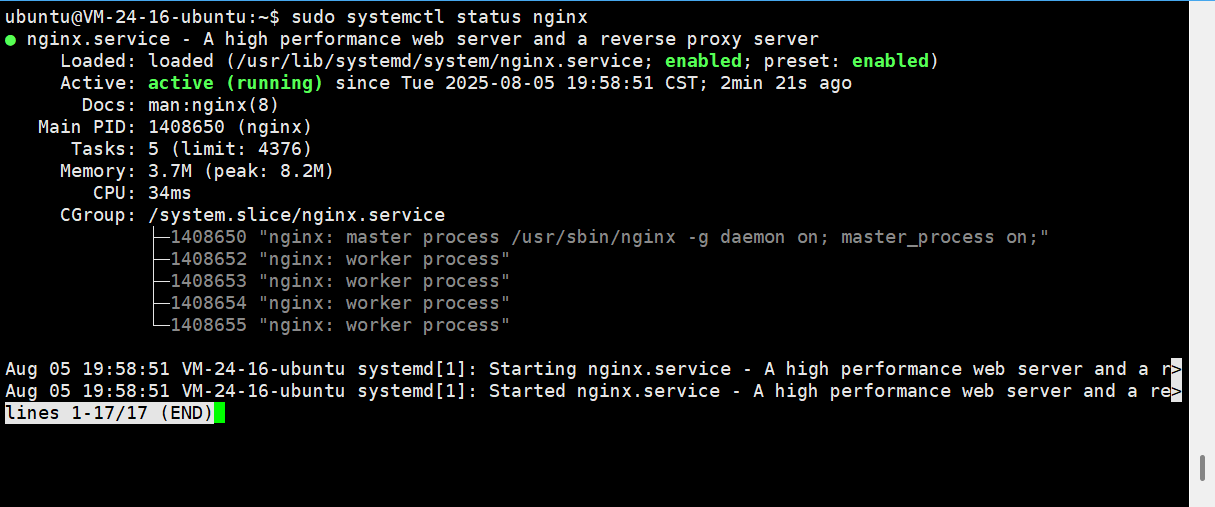
nginx存放静态资源
业务要求:想将静态资源放在 /var/nginx/resources 目录下
知识点:nginx配置文件中包含一个默认的虚拟主机配置(/etc/nginx/sites-available/default),监听80端口,开发者可以修改此文件添加配置
修改文件
shellsudo vi /etc/nginx/sites-available/default修改server_name和添加location块
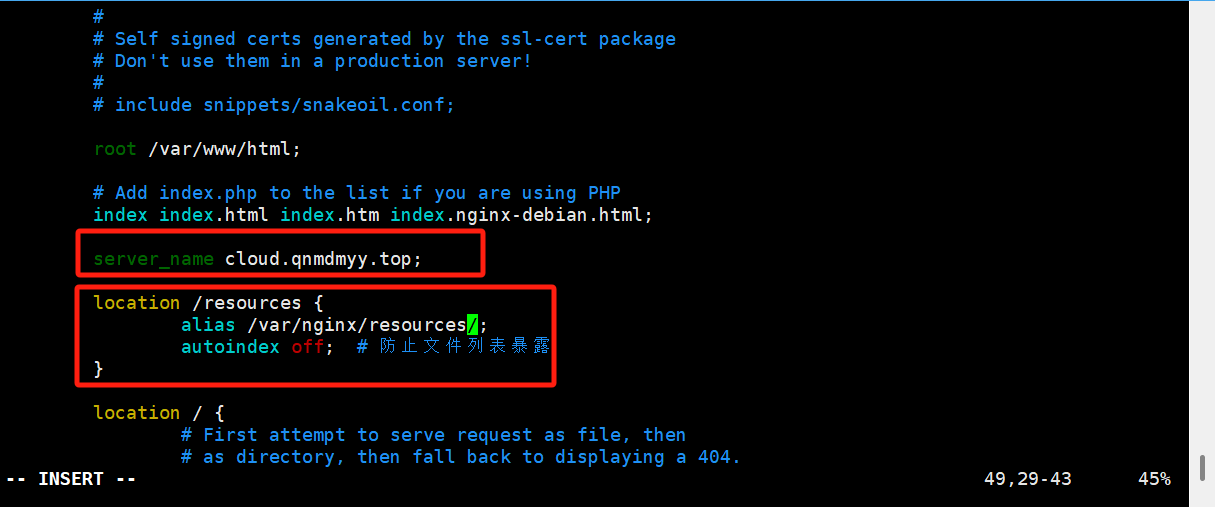
注意
- 如果是root,那么当用户访问 域名:80/resources/test.png时,实际的访问路径是 /var/nginx/resources/resources/test.png
- 如果是alias,那么当用户访问 域名:80/resources/test.png时,实际的访问路径是 /var/nginx/resources/test.png
- 另外:alias的值 /var/nginx/resources/ 结尾必须带斜杠!!!
修改文件后,重新加载nginx以应用修改(必不可少)
shellsudo systemctl reload nginx
常用命令
启动nginx服务
shellsudo systemctl start nginx停止nginx服务
shellsudo systemctl stop nginx重新启动nginx服务
shellsudo systemctl restart nginx查看nginx服务当前状态
shellsudo systemctl status nginx查看错误日志(nginx日志文件位于 /var/log/nginx/ 目录下)
shellsudo tail -f /var/log/nginx/error.log
参考文档
ubuntu卸载nginx
引言
- 此卸载是针对上面通过 Ubuntu 官方的 APT 包管理器安装的方式进行卸载
卸载nginx
停止nginx服务(可选,但推荐先执行)
shellsudo systemctl stop nginx移除nginx软件包以及其配置文件
shellsudo apt purge nginx nginx-common nginx-corepurge命令会删除软件包及其所有配置文件,比remove更彻底
自动移除不再需要的依赖包
shellsudo apt autoremove清理残余的缓存文件(可选)
shellsudo apt autoclean手动清理(强烈建议)
shell# 删除网站配置文件及虚拟主机目录(如果存放在默认位置) sudo rm -rf /etc/nginx # 删除网站内容存放目录(如果存放在默认位置) sudo rm -rf /var/www/html # 删除 Nginx 日志文件 sudo rm -rf /var/log/nginx- 虽然软件包被移除了,但一些由 Nginx 创建的数据目录和日志文件可能仍会保留。为了彻底清理,可以手动删除这些目录(操作前请确保里面没有你需要备份的数据)
验证卸载结果
shell# 检查 Nginx 软件包是否还存在 dpkg -l | grep nginx # 检查 Nginx 进程是否还在运行 ps aux | grep nginx- 如果命令没有任何输出(或只有
grep命令自身进程),则表示卸载成功
- 如果命令没有任何输出(或只有